BodyDex guide

AI macro tracker — free macros, photo logging

How to set protein, carb, and fat targets, and use AI photo logging to fill them in seconds. Updated August 2026.

From plate to food diary
01Scan your meal02Review each item03Log your macros

The short answer

Estimate protein, carbs and fat from a meal photo, then check the details.

  • Editable food estimates
  • Daily and weekly macro targets
More context

What is an AI macro tracker? An AI macro tracker is a food-logging app that estimates protein, carbs, and fat from a meal photo instead of relying only on manual search. BodyDex pairs that photo estimate with a FatSecret, USDA, and Open Food Facts database so every AI entry can be checked and corrected, and it tracks your targets across the day and the week.

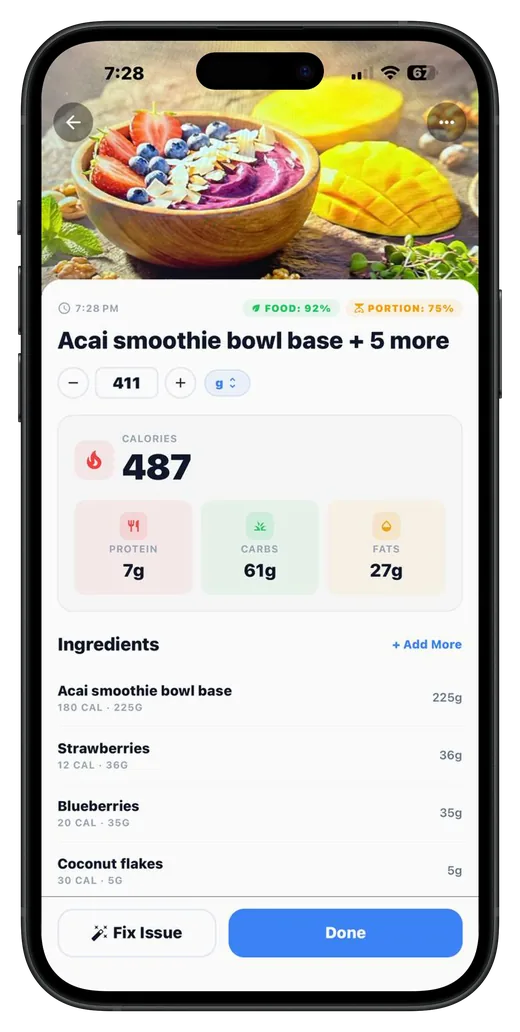
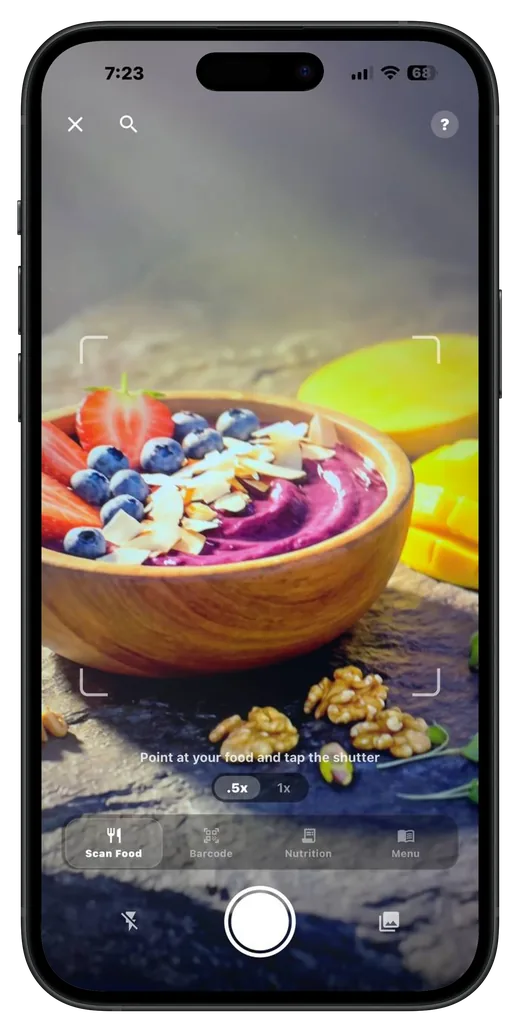
How does photo food logging work? Take one photo of the plate. The multi-item scanner identifies each food and returns estimated grams plus protein, carbs, and fat per item. Estimates depend on the ingredients visible in the photo and on portion-size inference, so review each result: adjust the portion, or swap to a sourced database entry — BodyDex labels the source and flags community data.

What is free in BodyDex? Custom protein, carb, and fat targets are free in BodyDex — no Premium gate, unlike MyFitnessPal, where custom gram-level macro goals require Premium ($19.99/mo). Manual logging, barcode scanning, and recipes are free too. Premium ($9.99/mo or $79.99/yr, 7-day free trial) unlocks AI photo scans, voice logging, and the AI coach.

What an AI macro tracker actually has to do

Custom protein, carb, and fat targets

A real macro tracker lets you set your own targets, not pick from a preset list. BodyDex keeps custom macros in the free tier; MyFitnessPal gates custom gram-level macro goals behind Premium ($19.99/mo) — its free tier keeps the default daily macro totals. Full comparison: free custom macros vs MyFitnessPal Premium.

Daily and weekly views

Some days you over-shoot, others you under-shoot. A weekly view tells you whether you're on average where you want to be — more useful than obsessing over a single day.

AI photo macro estimation

AI photo scanning covers the meals you don't want to weigh and log. Estimates depend on the ingredients visible in the photo and on portion-size inference, so verify and edit each result. BodyDex's scanner is multi-item per photo so a full plate logs in one capture. Compare scanners: BodyDex vs Cal AI for photo food logging.

Manual override on every entry

AI estimates are useful, not perfect. Every scanned item should be one tap away from a swap to a sourced database entry — BodyDex labels the source and flags community data — so you can fix portion or item identification mistakes.

Recipe builder with serving math

Cook once, log many times. A recipe builder that computes macros per serving turns a 5-minute log into a 5-second log for foods you make at home.

Connection to weight, training, and protocols

Macros only matter in context. A tracker that lives in the same app as weight, workouts, and peptide / GLP-1 doses lets you actually see what's working.

How to set macros in BodyDex

  1. 1Open onboarding or Profile → Edit Nutritional Goals

    First time: macro setup is part of onboarding. Existing users: open the Profile tab and tap Edit Nutritional Goals.

  2. 2Pick a goal preset

    Choose Lose Weight, Maintain Weight, or Gain Weight on Edit Nutritional Goals to set sensible calorie and macro defaults.

  3. 3Customize your macro split (optional)

    For a custom ratio, open a macro's detail screen and choose Custom — set your protein, carb, and fat percentages with sliders, and BodyDex derives the gram targets from your calorie target.

  4. 4Log a meal — manual or AI scan

    Open Search from the food log or the center + button for sourced database entries (BodyDex labels the source and flags community data), use the barcode scanner for packaged foods, or tap the center + button and choose Scan for an AI photo scan (Premium). AI scans return identified items with portions you can confirm or correct.

  5. 5Watch the daily ring close

    The home tab shows protein, carb, fat, and calorie rings filling as you log. Tap any ring for the day-by-day breakdown.

FAQ

Is macro tracking really free in BodyDex?

Yes. Custom protein, carb, and fat targets are part of the free tier with no paywall. Manual food logging, the barcode scanner, and recipes are also free. AI photo scanning, voice food logging, and the AI nutrition coach are Premium features (7-day free trial available).

Why does MyFitnessPal charge for macros?

MyFitnessPal gates custom gram-level macro goals behind Premium ($19.99/mo or $79.99/yr) — the free tier still shows daily default macro totals, but you can't set precise gram targets without paying. That's the single biggest reason serious lifters often look elsewhere. BodyDex keeps custom macros free.

How accurate is AI macro estimation?

Photo-based macro estimation depends on the ingredients visible in the photo and on portion-size inference, so treat each scan as a fast starting point and verify or edit the result. For precision (cutting prep, competition), weigh and log manually. For everyday logging, AI scans are the fastest way to keep a real macro log going. Every AI entry is one tap away from a swap to a sourced database entry; BodyDex labels the source and flags community data.

Does BodyDex have an adaptive macro algorithm like MacroFactor?

Not yet. MacroFactor's adaptive expenditure algorithm is genuinely best-in-class for cutting / lean bulking / recomp. BodyDex uses fixed targets you set during onboarding (recalculable any time). What it does do is project your goal date from your real weigh-in trend — the Weight Stats card on the Progress tab updates it weekly and says whether you're ahead, on track, or behind your target date — but expenditure itself isn't adaptively modeled. Adaptive expenditure is on our roadmap. If the adaptive algorithm is your single must-have feature, see the full comparison at /compare/bodydex-vs-macrofactor.

Can I track GLP-1 medications and macros in the same app?

Yes. BodyDex was built for this — track macros, weight, and GLP-1 doses (semaglutide, tirzepatide, retatrutide) side by side. See the GLP-1 tracker guide for details.

Is my macro data private?

Food logs, weight, recipes, and protocols live in a local SQLite database on your device — there is no centralized BodyDex database of user food entries. AI photo scans are sent to BodyDex's server only for analysis; the photo isn't saved to your food log, and no name, email, or account identity is attached — see our privacy policy for how AI providers may use submitted content.

Related guides

GLP-1 tracker →

Track semaglutide, tirzepatide, retatrutide doses alongside macros and weight.

vs MacroFactor →

Adaptive expenditure algorithm vs. AI scanning + free tier — full comparison.

Your nutrition, decoded.

Try BodyDex free

Free macros, AI photo scanning, recipes, and peptide tracking on iPhone or Android.

  • iOS & Android
  • Free to download
Download onApp StoreGet it onGoogle PlayDownload BodyDex. Opens in a new tab.

Pricing and features verified August 2026 from each publisher's public marketing pages and app-store listings — products evolve, so always confirm current details on the publisher's site before deciding. All trademarks are the property of their respective owners.